
SubAgents and Task Delegation in Claude Code.

Previous post: Foundations: CLAUDE.md and Project Configuration

When I ask Claude Code to refactor a large feature, sometimes when then context grows, the focus drifts, details get lost somewhere and by the time it finishes, I’m not sure what it changed or why, and the answer to “can you explain what you did” is not always that clear.
In my experience, subAgents can fix this. They’re Claude Code’s way of spawning specialized workers for specific parts of a larger task. Think of it like a lead developer who delegates to team members instead of trying to write every line themselves. The lead keeps the big picture, while the team members go deep on specifics.
Built-in Agent Types
Claude Code comes with specialized agent types, each optimized for different work:
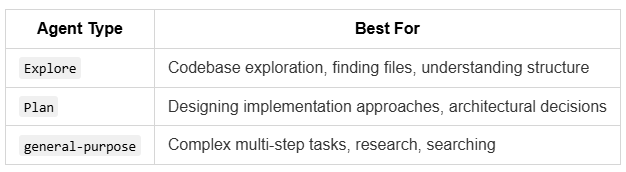
Explore agents are fast and lightweight. Use them liberally when you need to understand a codebase before making changes. “Find all files that handle user authentication” or “What’s the structure of the API routes?” or “How does the payment flow work?”
Plan agents think through options, consider tradeoffs, and propose structured approaches. Useful when you want to validate a direction before committing to it. “Design an approach for adding rate limiting to our API” or “Plan the migration from REST to GraphQL.”
General-purpose agents are the workhorses for complex tasks. “Implement the user profile feature based on the spec” or “Debug why tests are failing in the payment module” or “Refactor the database queries to use the new ORM.”
How Spawning Works
You don’t manually spawn agents in most cases. Claude Code decides when to use them based on the task. But understanding the mechanism helps you write better prompts.
When Claude Code spawns an agent, it’s essentially packaging up a task description, selecting an agent type, providing relevant background from the conversation, and listing available tools. The agent works in isolation, then reports back.
Parallel execution happens when agents work simultaneously on independent tasks: finding information in different parts of the codebase, running independent analyses, searching for patterns across multiple locations.
Sequential execution happens when agents need to wait for previous results: when later work depends on earlier findings, multi-phase implementations, validation before proceeding.
TIP: Claude Code handles this automatically, but you can influence it. If you say “first analyze X, then implement Y based on findings,” you’ll get sequential. If you say “analyze X, Y, and Z,” you’ll likely get parallel.
Patterns That Works to me
Explore Before Acting
Before making significant changes, spawn explorers:
"Before we refactor the notification system:
1. Find all places that send notifications
2. Identify the different notification types
3. Check what tests exist for notifications
Then propose a refactoring approach."
This prevents the “I’ll just start changing things” approach that often leads to missed dependencies. I once watched Claude Code refactor a “notification service” without realizing the project had three different notification systems. An exploration step would have caught that in thirty seconds.
Divide by Concern
For large features, split by logical boundaries:
"Implement the new reporting feature:
- One agent handles the database queries and models
- One agent handles the API endpoints
- One agent handles the frontend components
Coordinate so the interfaces match."
Each agent has a smaller problem space. The parent orchestrates.
Parallel Investigation
When debugging unclear issues:
"This endpoint is slow. Investigate:
- Database query performance (check explain plans)
- N+1 query patterns
- External API call timing
- Memory usage during request
Report findings separately."
Multiple angles simultaneously instead of checking one theory at a time. I’ve seen this cut debugging time by 60% on complex performance issues.
Review and Implement
Separate planning from execution:
"First, have an agent review the existing code and document its patterns.
Then, have a different agent implement the new feature following those patterns."
The reviewer builds context that the implementer uses. Prevents “this doesn’t match the existing style” problems.
Context Sharing Between Agents
SubAgents don’t share context directly, but they share the filesystem. This is actually useful (and not, but there is a solution using Git worktree that I’ll later in this post).
One agent writes findings to a file. Another agent reads that file. Coordination happens through artifacts, not conversation.
For example, Agent 1 writes docs/analysis-results.md, Agent 2 reads it and acts on it.
This pattern also helps with persistence. The analysis survives even if context compacts.
When NOT to Use SubAgents
SubAgents add overhead. They’re not always the answer.
Don’t use SubAgents for simple, single-file changes (overkill), tasks requiring tight coordination (too much overhead), or when you need to interactively guide the work (parent can’t intervene mid-agent).
Signs you’re over-using SubAgents: agents keep asking for the same context, work takes longer than doing it directly, results need heavy post-processing by parent.
The overhead of spawning and coordinating agents is real. For quick tasks, direct execution is faster. A good rule: if the task fits in your head, it probably doesn’t need delegation.
Practical Example: Adding a Feature
Let’s trace through a realistic example.
Request: “Add a ‘forgot password’ flow to the authentication system”
What Claude Code might do:
Spawn Explore agent: “Find all authentication-related files, email templates, and password handling code”
Spawn Plan agent: “Design the forgot password flow considering: token generation, email sending, token expiration, password update endpoint”
Review plan with you (or proceed if autonomous)
Spawn implementation agents in parallel:
Agent A: Create password reset token model and database migration
Agent B: Implement API endpoints (
/forgot-password,/reset-password)Agent C: Create email template and sending logic
Sequential follow-up:
Agent D: Write tests for the new flow
Agent E: Update documentation
Each agent has a focused task. The parent coordinates timing and integration.
Limitations Worth Knowing
SubAgents are powerful but not magic.
What works well: parallelizing independent work, keeping focused context for complex analysis, separating exploration from implementation.
What’s harder than it looks: coordinating tightly coupled changes, handling when one agent’s work invalidates another’s, debugging when something goes wrong mid-agent.
A practical limitation you’ll hit: you can’t interrupt a SubAgent once it starts. If it’s going down the wrong path, you have to wait for it to finish or cancel the whole operation (or at least I don’t know how to do it, if you know, please let me know in the comments). This makes planning and clear task descriptions important.
Avoiding Collisions with Git Worktrees
When multiple agents work on the same codebase simultaneously, they can step on each other. Agent A modifies a file, Agent B modifies the same file, and now you have conflicts or lost work.
Git worktrees solve this. A worktree is a separate working directory that shares the same git history as your main repo. Each agent works in its own isolated directory, on its own branch, with no conflicts until you’re ready to merge.
How Git Worktrees Work
Your repo stays in one place. Each worktree is a linked directory with its own branch:
my-project/                    ← Main repo (main branch)
my-project-feature-api/        ← Worktree (feature-api branch)
my-project-feature-ui/         ← Worktree (feature-ui branch)
my-project-feature-tests/      ← Worktree (feature-tests branch)
All four share the same git history. Changes in one don’t affect others until merged.
Setting Up Worktrees
# From your main project directory
cd my-project

# Create a worktree for Agent A
git worktree add ../my-project-feature-api -b feature-api

# Create a worktree for Agent B
git worktree add ../my-project-feature-ui -b feature-ui

# Create a worktree for Agent C
git worktree add ../my-project-feature-tests -b feature-tests
Each command creates a new directory with a new branch, ready for independent work.
Running Agents in Separate Worktrees
Open separate terminal sessions, each in a different worktree:
# Terminal 1: Agent working on API
cd my-project-feature-api
claude "Implement the user profile API endpoints"

# Terminal 2: Agent working on UI
cd my-project-feature-ui
claude "Build the profile UI components"

# Terminal 3: Agent working on tests
cd my-project-feature-tests
claude "Write integration tests for the profile feature"
Each agent has full access to the codebase but works in isolation. No conflicts, no overwriting each other’s changes.
Merging the Work
When agents finish, merge their branches back:
cd my-project

# Merge API work
git merge feature-api

# Merge UI work
git merge feature-ui

# Merge test work
git merge feature-tests
If there are conflicts (say, both agents modified the same config file), git tells you and you resolve them once, cleanly.
Cleaning Up Worktrees
After merging, remove the worktrees:
git worktree remove ../my-project-feature-api
git worktree remove ../my-project-feature-ui
git worktree remove ../my-project-feature-tests

# Optionally delete the branches too
git branch -d feature-api feature-ui feature-tests
When to Use Worktrees
Use worktrees when you have multiple agents working on different features simultaneously, the work touches overlapping files, or you want clean, reviewable branches per feature.
You can use it, as well, for testing different approaches to solve something (I use this option A LOT).
Skip worktrees for quick, non-overlapping tasks (the overhead isn’t worth it), or when agents work on completely separate parts of the codebase with no shared files.
The overhead of setting up worktrees pays off when you’re running 2+ agents for more than a few minutes. For quick parallel searches or exploration, the regular shared codebase is fine.
Tips for Better Delegation
Be specific about scope. “Look at the auth files” is vague. “Find all files in src/auth/ and src/middleware/ that handle JWT tokens” is actionable.
Provide success criteria. “Analyze until you understand” is open-ended. “Report: what endpoints exist, what tests cover them, what patterns they follow” gives clear completion.
Anticipate dependencies. If Agent B needs Agent A’s output, say so. “First A, then B using A’s findings.”
Keep parent context light. The parent coordinates; it doesn’t need to hold all details. Let SubAgents hold the details.
Next Steps
SubAgents let you divide and conquer. Combined with good task decomposition, they turn complex features into manageable chunks.
What you can do now:
Identify a complex task you’ve been putting off
Break it into 3-4 independent subtasks
Ask Claude Code to tackle them with explicit parallel or sequential structure
Observe how it delegates and what results you get
The next post covers something more ambitious: Ralph Wiggum, which lets Claude Code run autonomously in loops until a task is truly complete. If SubAgents are delegation, Ralph Wiggum is autopilot.
Sources
Next article: Autonomous Execution with Ralph Wiggum
The built-in subagent types are useful but they all still eat from the same Claude token budget. I've been experimenting with a different kind of delegation. Instead of spawning another Claude instance, shell out to a completely different model via bash.
OpenCode has a headless mode that turns it into a unix-style subprocessor. Claude Code calls opencode run, which spins up Kimi K2.5 on Synthetic, does the search or fact-check, and pipes the result back to stdout. Separate model, separate token pool, separate provider. Claude never sees the raw search results, just the verdict.
Set up the whole thing as a Claude Code skill https://reading.sh/how-i-use-opencode-as-a-headless-worker-inside-claude-code-fed04b8358f9 so it triggers automatically when fact-checking comes up. The key insight from your post still holds though; the explore-before-acting pattern is just as important when your explorer is a different model entirely.
Jose, the Git worktrees recommendation for parallel agents is underappreciated. Most guides skip this and then wonder why agents step on each other's files. I ran into exactly this problem early on when testing 4 Opus 4.6 agents working on different parts of the same project. The built-in agent types you cover, Explore, Plan, and General-purpose, work well for sequential delegation. But with Agent Teams in Opus 4.6, the delegation becomes truly parallel. Multiple general-purpose agents can now work simultaneously with autonomous coordination, which changes the throughput equation significantly. Documented the parallel version of this pattern: https://thoughts.jock.pl/p/opus-4-6-agent-experiment-2026