
Foundations: CLAUDE.md and Project Configuration

Note: This is a series of 8 articles that I’ll be posting in the next days, trying to explain how I work with Claude Code and the tools I use.
In my case I was using Claude Code for a week. Impressive, until suggest patterns I am not using, it modifies files I explicitly don’t want touched or it runs commands that work on some other project, just not this one.
Claude Code doesn’t know the rules of your house. I’m going to show you how to fix that.
The configuration takes maybe twenty minutes. A couple of files, nothing fancy. But getting it right means the difference between an agent that fights your codebase and one that works with it. If you’ve felt like Claude Code keeps forgetting context or makes assumptions you didn’t ask for, this is where you fix that.
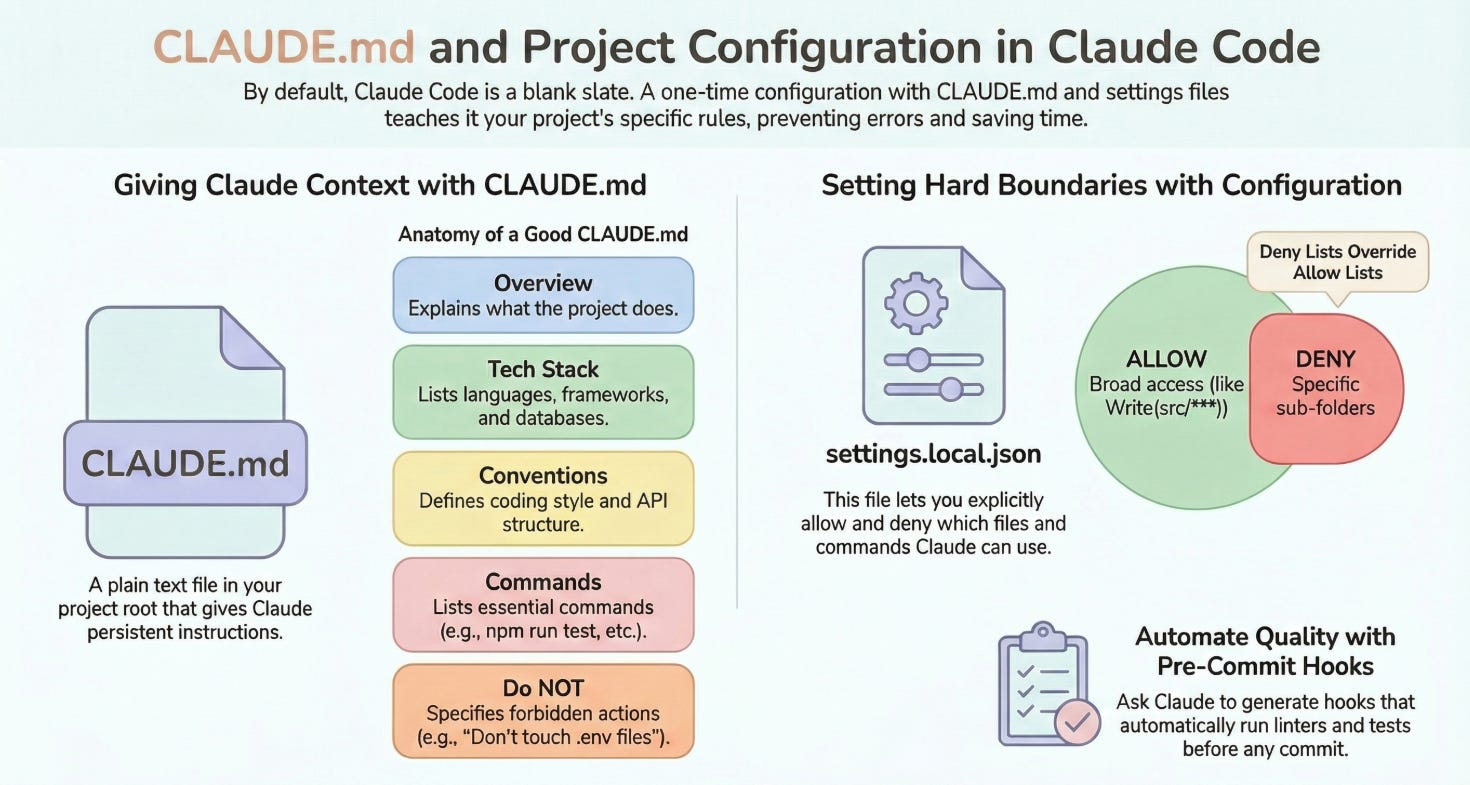
What CLAUDE.md Actually Does
Every time Claude Code starts working in a directory, it looks for a file called CLAUDE.md. This file becomes part of its system prompt, the instructions it carries in its head throughout the entire session.
The short version is that whatever you put in CLAUDE.md shapes how Claude thinks about your project.
In practice, this means you can tell it what the project does (so it doesn’t have to guess), what conventions you follow, what it should never touch, and what commands to run for tests and builds. Without this file, Claude Code treats every project like a blank slate. With it, you get an agent that already knows the terrain.
Now, you might be thinking: “Great, another config file to maintain.”
Fair. But most config files talk to tools. CLAUDE.md talks to an agent that can read. You don’t need perfect syntax or exhaustive coverage. You need enough context that Claude Code makes reasonable assumptions instead of wrong ones. A few paragraphs of plain English (or Spanish or whatever… I’m Spanish, but I use English in my code) go a long way.
Anatomy of a Good CLAUDE.md
A structure that works. You don’t need all of this, but knowing what’s possible helps:
# Project: [Name]

## Overview
[2-3 sentences about what this project does and why it exists]

## Tech Stack
- Language: TypeScript 5.x
- Framework: Next.js 14 (App Router)
- Database: PostgreSQL via Prisma
- Testing: Vitest + Playwright

## Project Structure
src/
  app/          # Next.js app router pages
  components/   # React components
  lib/          # Utility functions
  services/     # Business logic
prisma/         # Database schema

## Conventions
- Use named exports, not default exports
- Components use PascalCase, utilities use camelCase
- All API routes return `{ data, error }` shape
- Tests live next to the files they test (*.test.ts)

## Commands
- `npm run dev` - Start development server
- `npm run test` - Run test suite
- `npm run lint` - Run ESLint
- `npm run build` - Production build

## Do NOT
- Modify files in `/prisma/migrations` directly
- Use `any` type without explicit justification
- Add new dependencies without asking first
- Touch `.env` files or commit secrets

## Current Focus
[Optional: what you're working on right now, helps Claude prioritize]
Boundaries Matter More Than You Think
That “Do NOT” section looks like a formality. It really isn’t.
Claude Code is helpful by default. Sometimes too helpful. Without explicit boundaries, it will “improve” things you didn’t ask it to improve. I’ve watched it reorganize migration files to be “more consistent.”
Being explicit about what’s off-limits saves you from undoing well-intentioned mistakes.
Project vs Global Settings
Claude Code has two configuration scopes:
Project-level (.claude/ directory in your project):
settings.local.jsoncontrols permissions and behaviors for this projectIgnored by git (add to
.gitignore)Only affects this specific codebase
User-level (~/.claude/):
Global settings that apply everywhere
Skills, plugins, default behaviors
MCP server configurations
For most projects, you want project-level settings. Different codebases have different needs. To be honest I barely use the User-level because I use now Claude Code for so many things, that it simply doesn’t make any sense (I’ll talk about this in an extra article, not part of this series).
settings.local.json
This file controls what Claude Code is allowed to do. A practical starting point:
{
  "permissions": {
    "allow": [
      "Bash(npm run *)",
      "Bash(git status)",
      "Bash(git diff *)",
      "Bash(git add *)",
      "Bash(git commit *)",
      "Read(*)",
      "Write(src/**)",
      "Write(tests/**)",
      "Edit(src/**)",
      "Edit(tests/**)"
    ],
    "deny": [
      "Bash(rm -rf *)",
      "Bash(git push *)",
      "Write(.env*)",
      "Write(prisma/migrations/**)"
    ]
  }
}
The pattern: explicitly allow what you want, explicitly deny what you don’t. Wildcards (*, **) work like you’d expect.
A few notes worth mentioning. Read(*) is usually fine since reading doesn’t break things. Be careful with Bash permissions because npm run * is safer than Bash(*). And the deny list overrides allow, so you can be generous with allows and specific with denies.
What happens if you skip this? Claude Code will ask permission for everything. Every file write, every command. You’ll spend more time approving actions than actually working. The permissions file is about trust boundaries, letting Claude Code move fast within safe limits.
Pre-commit Hooks: An Underrated Power Move
Something most people don’t think to do: ask Claude Code to generate pre-commit hooks for your project.
This matters more than it sounds because autonomous workflows work best when there are automated checks. If Claude Code makes a change that breaks linting or fails tests, the pre-commit hook catches it immediately, before it ever hits your git history. No cleanup. No “wait, when did this break?”
You can use something like this:
Analyze this project and generate relevant pre-commit hooks. Consider:
- What language/framework is this?
- What linters and formatters are configured?
- What tests should run before commits?
- What security checks make sense?

Create a .pre-commit-config.yaml and explain each hook.
And you’ll (more or less) get:
# .pre-commit-config.yaml
repos:
  - repo: https://github.com/pre-commit/pre-commit-hooks
    rev: v4.5.0
    hooks:
      - id: trailing-whitespace
      - id: end-of-file-fixer
      - id: check-yaml
      - id: check-added-large-files
      - id: detect-private-key

  - repo: https://github.com/pre-commit/mirrors-eslint
    rev: v8.56.0
    hooks:
      - id: eslint
        files: \.[jt]sx?$
        types: [file]
        additional_dependencies:
          - eslint@8.56.0
          - eslint-config-next@14.0.0

  - repo: https://github.com/pre-commit/mirrors-prettier
    rev: v3.1.0
    hooks:
      - id: prettier
        types_or: [javascript, typescript, json, yaml, markdown]

  - repo: local
    hooks:
      - id: typecheck
        name: TypeScript type check
        entry: npm run typecheck
        language: system
        types: [typescript]
        pass_filenames: false
Then install with:
pip install pre-commit
pre-commit install
Now every commit runs through these checks automatically. When Claude Code (or you) tries to commit something broken, it fails fast instead of polluting the git history.
If you’re using husky (common in Node.js projects), the approach is similar:
npx husky init
Then in .husky/pre-commit:
#!/bin/sh
npm run lint
npm run typecheck
npm run test -- --run
Pre-commit hooks turn implicit standards into explicit gates. Claude Code learns quickly what passes and what doesn’t. You stop playing cleanup crew.
Memory and Context Optimization
Claude Code has a context window, a limit on how much text it can “remember” at once. When that fills up, it compacts the conversation, summarizing older content to make room for new.
This is fine for short tasks. For longer sessions, you lose the context and you don’t want to…
How to minimize context loss:
Keep CLAUDE.md focused. Long CLAUDE.md files eat into your context budget. Include what matters, not everything you could possibly say.
Use external references. Instead of pasting entire specs into CLAUDE.md, point to files:
## Specs
See `docs/api-spec.md` for API requirements.
See `docs/architecture.md` for system design.
Claude Code can read these when needed instead of carrying them always.
Structure conversations. Start new sessions for unrelated tasks instead of one endless conversation. Each session gets fresh context.
Use Beads for persistence. (We’ll cover this in Post 4.) For long-running work, external task tracking survives compaction.
Where This Falls Short
CLAUDE.md helps. It doesn’t solve everything.
What it does well: sets consistent behavior across sessions, reduces repetitive explanations, prevents common mistakes through explicit rules, gives Claude Code domain knowledge it can’t infer from code alone.
What it won’t do: make Claude Code an expert in your specific business logic, prevent all mistakes (it will still surprise you sometimes), or replace your judgment about what to automate.
If you’re coming from a “just figure it out” mindset, this feels like overhead. It is. But the ROI shows up in every subsequent session where you don’t have to explain the same things again. Twenty minutes of setup saves hours of repeated context-setting.
One more thing. CLAUDE.md isn’t static. As your project evolves, update it. New conventions, new forbidden zones, new commands. The file should grow with your codebase.
Next Steps
With your configuration in place, you have a foundation. Claude Code knows what your project is, what it’s allowed to do, and what standards to maintain.
What you can do now:
Create a
CLAUDE.mdin your project rootSet up
.claude/settings.local.jsonwith appropriate permissionsAsk Claude Code to generate pre-commit hooks
Test by asking Claude Code to make a small change and verifying it follows your rules
In the next post, we’ll look at SubAgents and how to break complex tasks into parallel work that multiple agents can handle simultaneously.
Sources
Next: SubAgents and Task Delegation (To be published)